Camera language that sticks
Phrases like "low tracking shot", "slow push in" or "drone pulls back over the coast" are treated as direction, not decoration, so the framing moves the way you wrote it.
Our text to video AI turns a written scene — the subject, the action, the camera and the light — into a moving clip. No footage and no reference image, just a paragraph of direction.
You need an account to generate. Each run spends credits according to model, duration and resolution, and the exact cost is shown on the button. Failed tasks are refunded automatically.
Every clip below started as words only. Compare the written direction with the first frame and the full take to see how much a few sentences can carry.
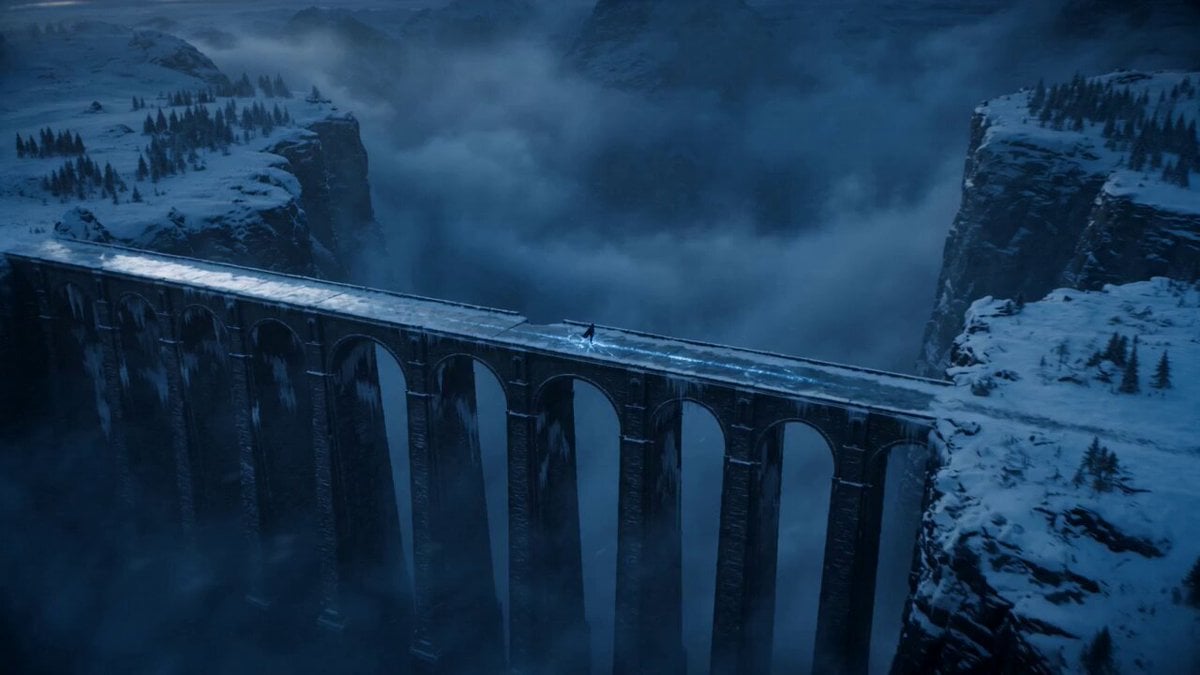 Opening frame
Duration: 15 seconds Style: Ultra-realistic cinematic, dark fantasy, hyper-realistic, 9:16 vertical, 8K, 60fps. 0–3s: A wide aerial shot reveals an ancient frozen stone bridge stretching over a bottomless icy canyon during blue hour. Snow falls steadily as blizzards sweep across distant mountains. Cracked ice glows with mysterious blue runes beneath the warrior's feet. Cinematic drone push-in. 3–7s: The camera slowly circles behind a mysterious hooded warrior standing motionless on the bridge. A tattered black cloak whips violently in the freezing wind. Ultra-detailed medieval armor glistens with frost while a glowing silver sword reflects the icy surroundings. Volumetric fog drifts through the canyon. 7–11s: A low-angle tracking shot moves toward the warrior as they slowly raise the enchanted sword. The blue runes pulse brighter across the frozen bridge, snow swirls dramatically around the cloak, and distant lightning briefly illuminates the storm clouds and snow-covered peaks. 11–15s: The warrior takes one powerful step forward. A shockwave of glowing blue energy races through the ancient runes beneath the ice, sending sparkling frost across the bridge. The camera rapidly pulls back into a breathtaking aerial view as the blizzard intensifies, ending on an epic cinematic wide shot with the lone warrior standing against the frozen wilderness.
A good prompt reads like a shot list: who is in frame, what they do, where the camera sits and how the light falls. The model turns that description into continuous motion — a complete video from text alone.
Every text to video model here accepts plain text as its only input. Draft on Seedance 2.0 Mini at 480p to check the idea cheaply, then move the same prompt to Seedance 2.5, Veo 3.1 or Kling v3 when the shot needs more realism, resolution or sound.
You decide the scene; the model decides the in-between frames. These are the levers that make the biggest difference.
Phrases like "low tracking shot", "slow push in" or "drone pulls back over the coast" are treated as direction, not decoration, so the framing moves the way you wrote it.
There is nothing to upload. The subject, the setting and the way things move all come from the prompt, which makes text the fastest way to test an idea that has not been shot.
Pick 16:9 for YouTube, 9:16 for Reels and Shorts or a square crop for the feed before you generate, so the composition is built for that frame instead of cropped from another.
Models with native audio add ambience, effects and short lines of dialogue that line up with the picture. Turn audio off when you plan to score the clip yourself.
Going from prompt to video takes three steps: write, choose, generate. Most of the craft is in the first one.
Start with one subject and one clear action, then add place, time of day and a camera move. Leave out style words unless the look really matters.
Choose a model, duration, aspect ratio and resolution. A four-second 480p draft is usually enough to tell whether the prompt is working.
Submit the task and keep working — it finishes in the background and lands in History. Play it back, tweak one instruction if needed, and download the MP4.
An AI video generator that works from text shines when the idea is clear in your head but expensive, slow or impossible to film.
Sketch a campaign in motion before booking a studio. Try the setting, the product move and the pacing, then hand the best take to the team as a living brief — or post it as is.
Generate the first three seconds that stop a scroll: a striking action, a strange location, a reveal. Vertical framing and a single clear event work best for Shorts, Reels and TikTok.
Describe a crane move, a chase or a one-take sequence and see a version of it on screen. It is a cheap way to align a crew on a shot before anyone builds anything.
Ask for a painted fairytale village, a stop-motion miniature or a glossy 3D toy set. Keep the style words consistent from start to end of the prompt so the look holds.
Storms over alien cliffs, glaciers at dawn, a city under the sea. Give the scene scale, weather and moving elements so it feels physical rather than like a still with a pan.
Turn an abstract point into one clear image in motion for a talk, a course or a landing page. One strong metaphor per clip reads far better than several crammed together.
Browse real prompts with the clips they produced. Load any of them into the generator above, then swap the subject, place or camera move to make it yours.
The cost of every run is shown before you click. Test ideas on short, low-resolution drafts and save credits for the version you actually want to publish.
A text to video model reads your prompt and generates a sequence of frames that matches it — the subject, the setting, the action and how the camera moves. It does not stitch stock footage together; each clip is rendered from scratch, which is why wording the prompt clearly has such a large effect on the result.
You can open the generator, browse examples and write prompts without paying. Generating a video uses credits; when welcome credits are enabled, new accounts receive a starter balance that covers a few short drafts. The price of each run appears on the Generate button before you confirm.
No. On this page the generator opens on the Text tab, so the prompt is the only input. If you later want to start from a photo, switch the Create from control to Image and the same workspace runs image to video instead.
Be concrete and keep it to one event. Name the subject, what it does, where it happens and one camera move — for example, "An old fisherman pulls a net onto a wooden boat at sunrise, spray in the air, slow handheld push in." Specific nouns and verbs beat long lists of adjectives.
It depends on the shot. Seedance 2.0 Mini is the default because it is quick and inexpensive for drafts. Seedance 2.5 and Veo 3.1 are strong choices for realism and sound, Kling v3 handles human movement well, and Sora 2 is good at longer, physics-heavy scenes. Running one prompt on two models is the fastest way to decide.
Each model supports its own range, and the duration control only offers lengths the selected model can produce. Start with four to six seconds while you are refining the action, then extend or switch to a model with longer clips once the scene works.
Yes, with models that support native audio. They can generate ambience, sound effects and short dialogue in sync with the picture. Other models return a silent clip, and you can switch audio off on any supported model if you intend to add your own music or voice-over.
Yes. Choose 9:16 before generating. The model then composes the scene for a tall frame, keeping the subject centred and the action readable, which looks much better than cropping a widescreen result afterwards.
Open Sora does not add its own watermark to generated videos. You download the file the model produced, ready to edit or publish.
Video models juggle every instruction across every frame, and conflicting ideas pull against each other. Cut the prompt down to one main action, say what must stay constant and use a single camera move. When a take misses, change one thing at a time so you can see what fixed it.
Anywhere from under a minute to several minutes, depending on model, length, resolution and current demand. You don't need to wait on the page: tasks keep running in the background and appear in History when they are done.
Commercial use follows your plan and the current terms of service. You are responsible for what you ask the model to depict, so avoid real people's likenesses, trademarks and copyrighted characters unless you have the rights to use them.
One scene, a four-second draft, a few credits. Run it through the AI video generator and see whether the idea works on screen before you spend anything bigger on it.
Generate From Text